![DTS - Logo_No Tagline_White (For Digital).png]](https://courses-help.dts.edu/hs-fs/hubfs/DTS%20-%20Logo_No%20Tagline_White%20(For%20Digital).png?width=125&height=50&name=DTS%20-%20Logo_No%20Tagline_White%20(For%20Digital).png)
How do I claim my Logos resources for the DTS Tracks Program?
To claim your Logos resources, locate the claim email sent by Logos (not DTS) after completing your Tracks Orientation course, then follow the steps below. Check your spam folder if you do not see it.- Click the button in the email that says “Claim my resource(s).”
- Sign in or create an account with Logos on the webpage to which this brings you.
- Click the “Claim Library” button on the webpage.
- Download the Logos desktop app or open the Logos web app. To download the desktop app, visit logos.com/download; to use the web app, go to app.logos.com. You will also receive a confirmation email with instructions — note that the exact onboarding steps may vary, so refer to the latest guidance on the Logos website if needed.
Where do I find my Tracks Program resources inside Logos?
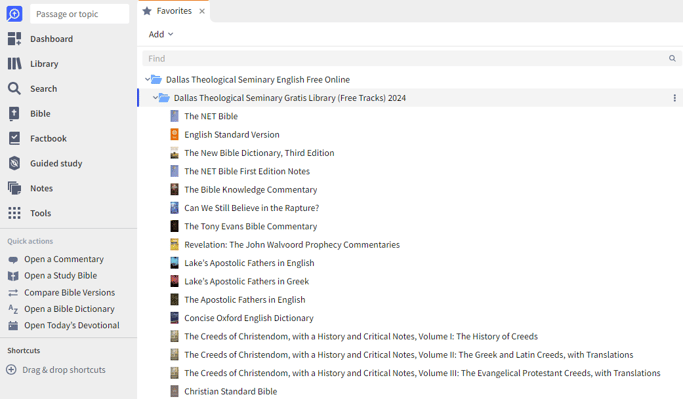
Once you have completed the steps above, your Tracks Program resources will appear in your Logos library. To view them separately from other books, click Tools, then Favorites (note: the exact menu path may vary by Logos version — consult the Logos Help Center if these labels differ). There you will find a dedicated folder containing all the Logos resources for your program.Does the Logos package include all required Tracks Program resources?
Yes. The package includes everything required to complete the Tracks Program, as listed in the reading section of your Assignments course. It does not include many of the recommended resources referenced inside the free online courses.Invitation Email:
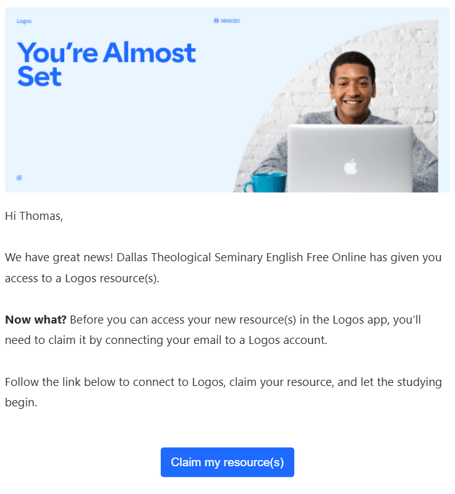
Confirmation Email:
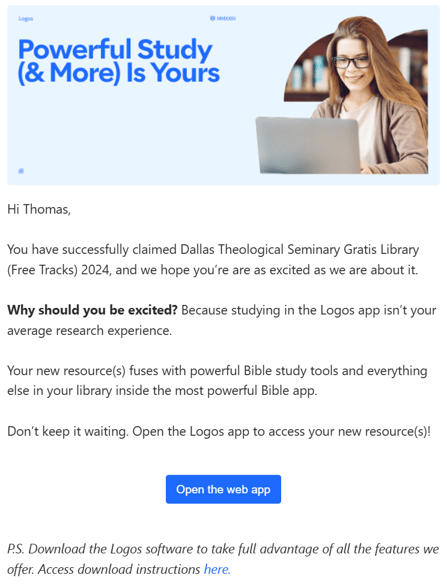
Where to Find the Full List of Tracks Books in Logos:
What should I do if I cannot claim my Logos package?
If you are still having trouble, try the following steps in order:- Go directly to
https://www.logos.com/academic/DTSFOEN/claimto claim your Logos package. - Use the email address you used to sign up for the DTS Tracks Program to claim your license.
- When prompted, sign in to your existing Logos account (or create one) and connect the Tracks package to your account.
Try using this link to claim your Logos package: https://www.logos.com/academic/DTSFOEN/claim
Use the email address you used to sign up for the DTS Tracks Program to claim your license. After this, the webpage will give you a chance to login to your existing Logos account if you have one and connect the Tracks package to this account.
If all else fails...
Submit a ticket here and we will work with you to resolve the issue!